


University Brand Standards
Southwest Minnesota State University is grounded in a resilient spirit of continuous improvement. Our brand is no exception. To succeed in our mission, we aim to present ourselves in a way that’s authentic, compelling, and consistent.
Southwest Minnesota State University's brand is built on genuine relationships, personal attention, student-centered experiences, and meaningful human connections.
The SMSU Brand and AI
As we navigate the capabilities of artificial intelligence, the integrity of the SMSU brand is our highest priority. AI-generated graphics may be used decoratively, but must not incorporate, modify or stylistically reinterpret official SMSU logos, seals, brand icons, or other trademarks. All AI-generated work should be reviewed carefully to ensure that it is accurate, appropriate, and aligned with University values and brand standards. AI should not be used to generate images or photos that are false representations of campus. This includes AI-generated images of buildings, monuments, statues, signage and campus features that do not exist in real life. This misrepresents SMSU, our campus, and our brand.
Any materials and graphics that use the SMSU name, trademarks, campus landmarks, mascot likeness, and related brand icons must be submitted for review and approval by Communications and Marketing: communications@smsu.edu
SMSU's Identity & Brand Standards Manual
The Identity & Brand Standards Manual first introduced SMSU’s redefined brand in May 2020. From our system of logos and color scheme to our messaging and tone, the brand standards create meaningful, lasting connections.
We are currently working on providing the brand standards in a web-friendly format that is fully ADA accessible. If you have any questions regarding the SMSU brand, please contact the Communication & Marketing Office at communications@smsu.edu.
What is Collegiate Trademark Licensing?
Among colleges and universities, countless third parties wish to associate themselves commercially with a school’s tremendous prestige and spirit.
The University asserts ownership and all right, title, and interest in and to its logos, which includes trademarks, service marks, trade names, designs, logos, seals, symbols, mascots, slogans and any other logo that is associated with or refers to the University.
The purpose of the program at SMSU is to protect and monitor the use of its logos as well as verify the quality and appropriateness of products, promotions, and advertising upon which those logos are used. It also ensures that the University receives the appropriate commercial value to compensate for the use of its trademarked logos, name, and verbiage.
Please note that all SMSU language and logos are trademarked. All uses must be approved in advance and must meet licensing and trademark requirements. Contact Communications and Marketing Office staff with questions.
Logos and Licensing
Any project (including apparel and promotional items) that will utilize the official SMSU logos, likeness, language, verbiage and official names should be coordinated with our office. Promotional items must be produced by a licensed vendor. Artwork must be reviewed approved by SMSU prior to printing/ordering. The official logos are trademarked and subject to all legal guidelines for licensing and use.
A current list of licensees will be made available here from our licensing agent, Learfield. Additional vendors and licensees are added regularly so check here regularly for the new lists:
Click to download the PDF: Licensed Vendor List
For more information, contact the Office of Communications and Marketing at 507-537-6255 or email communications@smsu.edu
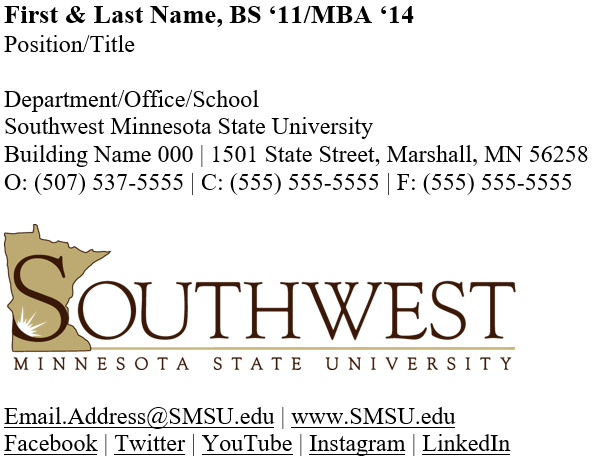
Your Southwest Minnesota State University email signature is your digital business card. It's important to present your email signature in a professional and unified manner like a traditional printed business card.
This email signature template contains 2 color variations (Institutional Brown & Black) as well as a version with a logo and one without a logo. This template is in Word format so you can copy and paste it right into your Outlook and Office365 accounts.
Preview with logo:
Preview without logo:
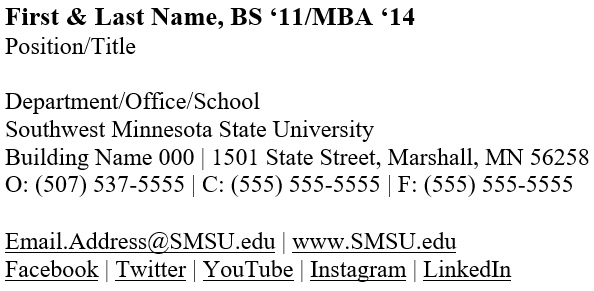
Be sure to include your updated signature on your Microsoft Outlook and Office 365 accounts.
How to Format Your Signature
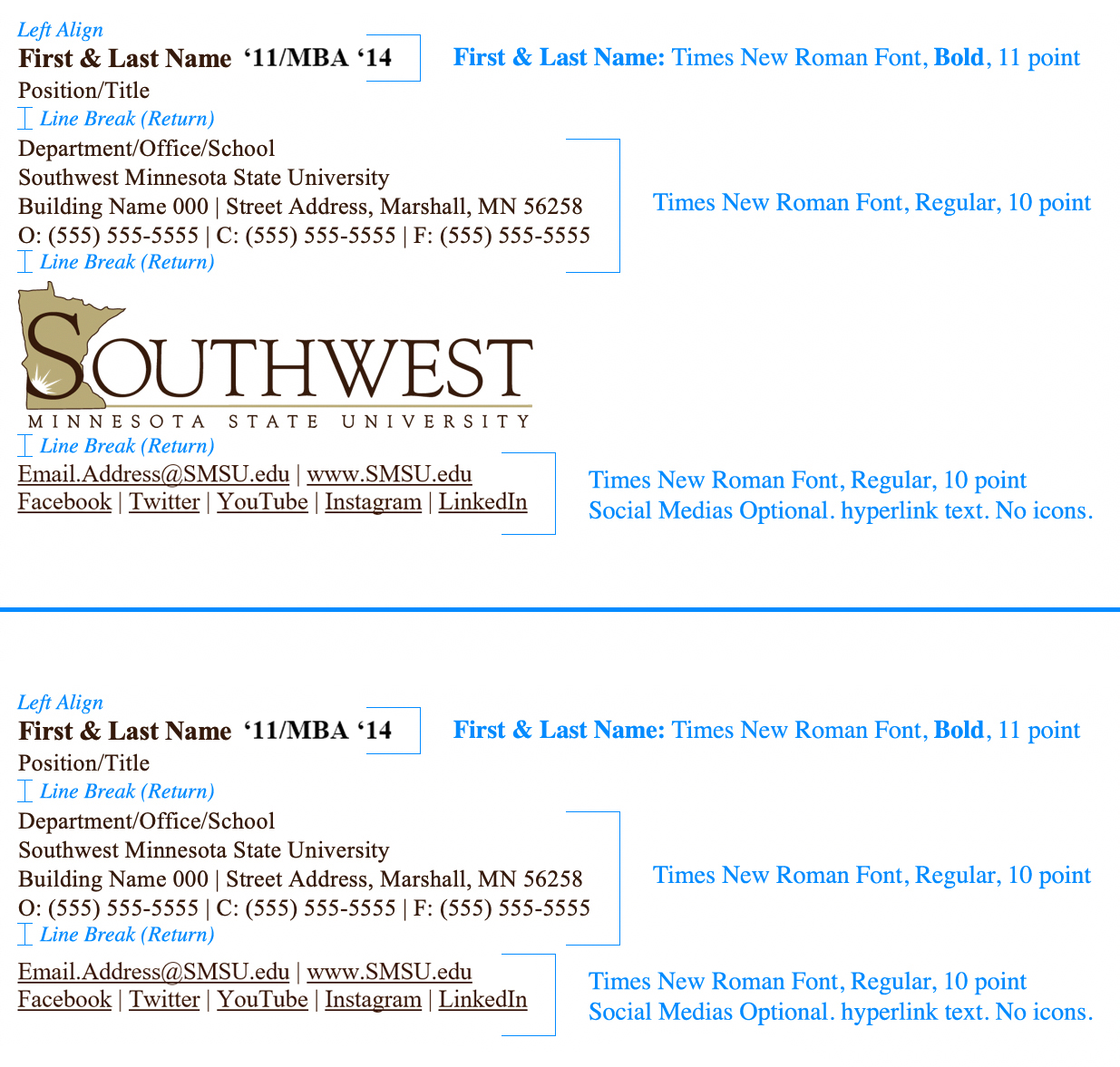
Name
- Font: Times New Roman
- Color: Black (recommended)
or Brown (using only this color mix, Red: 58, Green: 24, Blue: 7) - Format: Bold
- Size: 11 pt
Title and Contact Information Section
- Font: Times New Roman
- Color: Black
or Brown (using only this color mix, Red: 58, Green: 24, Blue: 7) - Format: Regular
- Size: 10 pt
Please spell out Southwest Minnesota State University. Do not use abbreviations of our name such as "Southwest MN State University" or "SW Minn State University" in your email signature. These are not approved or official abbreviations of our institutional name.
Color
Do not use colors outside of black or the Institution color Brown (Red: 58, Green: 24, Blue: 7).
Confidentiality and Other Disclaimers
Please include confidentiality and other types of disclaimers when necessary based on position and department needs. Disclaimers used by multiple individuals in one area or unit should be consistent from signature to signature.
Disclaimers recommendations:
- Location —a few line returns under your email signature
- Size — a point size or two smaller than the body copy of an email
- Color — black or dark gray
Email and Web Addresses
- Underline: Email and web addresses should be hyperlinked and underlined.
- Capitalize SMSU: Capitalize all occurrences of SMSU in an email address and before the ".edu" of a web address.
Example: Email.Address@SMSU.edu or www.SMSU.edu - Color: If possible, change default blue links to an acceptable color, such as black.
Font
Outlook users: Times New Roman
Non-Outlook users: Times New Roman
Do not use scripts or novelty fonts.
Labels
Single, capitalized letters are used to label contact information.
Phone: P
Office Phone: O
Direct Phone: D
Cellphone: C
Fax: F
Email: E (optional)
Website: W (optional)
If only one phone number is listed, P can be used or the label can be eliminated. If you think the single letters will be confusing, you may spell out the labels.
Reply Message Signature
Reply email signatures can be automated in Microsoft Outlook. A simplified reply signature can be developed following the original signature format, but reducing content to the following required information:
- Name
- Phone number(s)
- Southwest Minnesota State University
Social Media
SMSU social media accounts can be promoted in email signatures. To list social media accounts write out the site's name and hyperlink the text directly to the SMSU account. Do not include icons for social media sites.
Taglines and Quotes
Personal quotes and inspirational sayings should NOT be included in official SMSU signatures.
Pronouns
Many employees have begun to add preferred pronouns to their email signatures. If you choose to add your preferred pronouns these may be added in a line below the email/web address. For example:
First.Name@SMSU.edu | www.SMSU.edu
Pronouns: She/Her/Hers
Any questions you have about email signatures, please contact Communications and Marketing staff.
The Style and Usage Guide is currently being revised. If you have any questions, please reach out.
Important to note: Please spell out Southwest Minnesota State University or use the acronym SMSU. Do not use abbreviations of our name such as "Southwest MN State University" or "SW Minn State University" anywhere. These are not acceptable abbreviations of our institutional name.
Last Modified: 9/2/26 5:16 PM | Website Feedback